
In this article
- Step 1: Plan the Databricks on AWS account and workspace topology
- Step 2: Choose serverless compute, classic compute or both
- Step 3: Build the classic network with a customer-managed VPC
- Step 4: Control serverless compute egress and private access
- Step 5: Connect S3 to Unity Catalog with IAM roles
- Step 6: Encrypt with customer-managed keys in AWS KMS
- Step 7: Wire identity: IdP, SCIM and service principals
- Step 8: Govern compute and cost with policies and system tables
- Step 9: Automate everything and plan disaster recovery
- Common Databricks on AWS mistakes and a go-live checklist
- Frequently asked questions
- Next steps
Databricks on AWS gives you a managed lakehouse over your own S3 data, but a secure, low-maintenance platform depends on nine design decisions made early. This guide walks through each one, from workspace topology to disaster recovery, with the settings and trade-offs that matter in production.
Everything here reflects Databricks on AWS as of October 2026. Several pieces changed recently. Databricks now recommends starting with serverless workspaces, private connectivity from serverless compute to S3 and other AWS services became generally available, and some products were renamed: Delta Live Tables is now Lakeflow pipelines, and Databricks Asset Bundles are now Declarative Automation Bundles.
Key takeaways
- On Databricks on AWS, start with serverless workspaces unless you need custom networking, on-premises connectivity or specific compliance controls; classic workspaces with a customer-managed VPC cover those cases.
- Use one Unity Catalog metastore per region, separate dev and prod workspaces, and catalogs bound to workspaces as the main isolation unit, not dozens of workspaces.
- AWS PrivateLink, serverless egress control and customer-managed keys all require the Enterprise tier, so settle the tier before you design the network.
- Connect S3 through self-assuming IAM roles registered as storage credentials and external locations, and never give users direct access to buckets that hold managed tables.
- Lock down serverless egress with a restricted network policy, rolled out in dry-run mode first, and add private endpoints so serverless traffic to S3 stays on the AWS network.
- Run production as service principals with OAuth, and track cost and audit events in system tables rather than in ad hoc exports.
Step 1: Plan the Databricks on AWS account and workspace topology
In Databricks on AWS, the account sits above everything. It holds workspaces, Unity Catalog metastores, identities and network objects. Below the account, the region is the main unit of layout, because you can have only one metastore per region and every workspace in that region shares it.
For most organizations we recommend this baseline:
- One Databricks account, with workspaces in as few regions as your data residency rules allow.
- Separate workspaces per SDLC environment: at least dev and prod, usually staging as well. Databricks’ workspace strategy guidance makes the same split.
- One AWS account per environment, so prod IAM roles, VPCs and buckets never share a blast radius with dev.
- Catalogs per environment and domain (for example
sales_prodandsales_dev), bound to the workspaces that should see them. - An administrative workspace per region for managing Unity Catalog resources, as Databricks recommends.
Resist giving every team its own workspace. Databricks advises against separate workspaces for individual teams or small projects, and against more than 50 to 100 workspaces without strong justification and automation. Catalogs and schemas isolate data far more cheaply. Default workspace limits for Databricks on AWS are 10 on Premium and 50 on Enterprise.
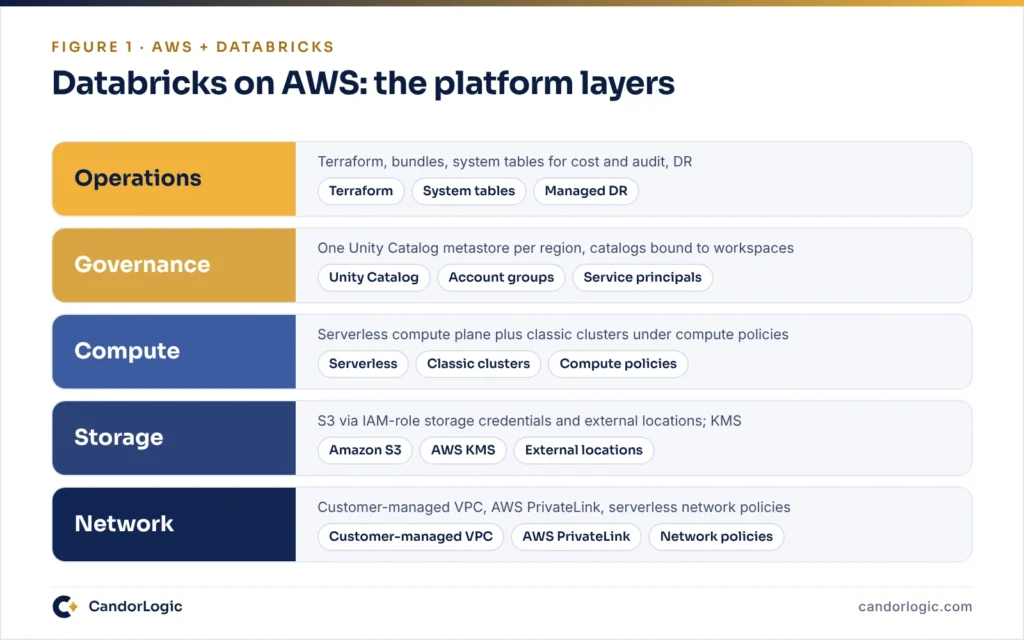
The rest of this guide builds the platform in layers. Figure 1 shows how they stack, from the network at the bottom to operations at the top.
Step 2: Choose serverless compute, classic compute or both
Databricks on AWS has two compute planes. Serverless compute runs in a serverless compute plane inside the Databricks account, in the same AWS region as your workspace. Classic compute runs in a VPC in your own AWS account. This choice drives the network design.
Databricks recommends starting with serverless workspaces for operational efficiency, and keeping classic workspaces for custom network configurations, on-premises connectivity or specific compliance requirements. A serverless workspace comes preconfigured with serverless compute and default storage, so there is no VPC or root bucket to create. Default storage is billed by Databricks, so AWS credits generally do not apply.
In practice, many Databricks on AWS estates run both: serverless for SQL warehouses, notebooks and most jobs, and classic clusters for workloads that hit the serverless limitations. The ones that matter most today:
- Scala and R are not supported in serverless notebooks, and only Spark Connect APIs are available, so RDD code must be rewritten.
- No compute-scoped init scripts or libraries, compute policies or instance pools.
- Streaming supports
Trigger.AvailableNow(), not processing-time or continuous triggers. - Runs are capped at seven days, and the Spark UI and Spark logs are not available.
| Dimension | Serverless compute | Classic compute |
|---|---|---|
| Where it runs | Databricks account, same AWS region | Your AWS account, inside the workspace VPC |
| Network you manage | Network connectivity configurations and network policies | VPC, subnets, security groups, NAT and AWS PrivateLink |
| Languages and APIs | Python and SQL via Spark Connect | Python, SQL, Scala and R, depending on access mode |
| Customization | Environments for libraries, limited Spark configs | Init scripts, cluster libraries, Graviton and spot instances |
| Cost levers | Standard vs performance-optimized jobs, usage policies | Compute policies, auto-termination, spot, DBU caps |
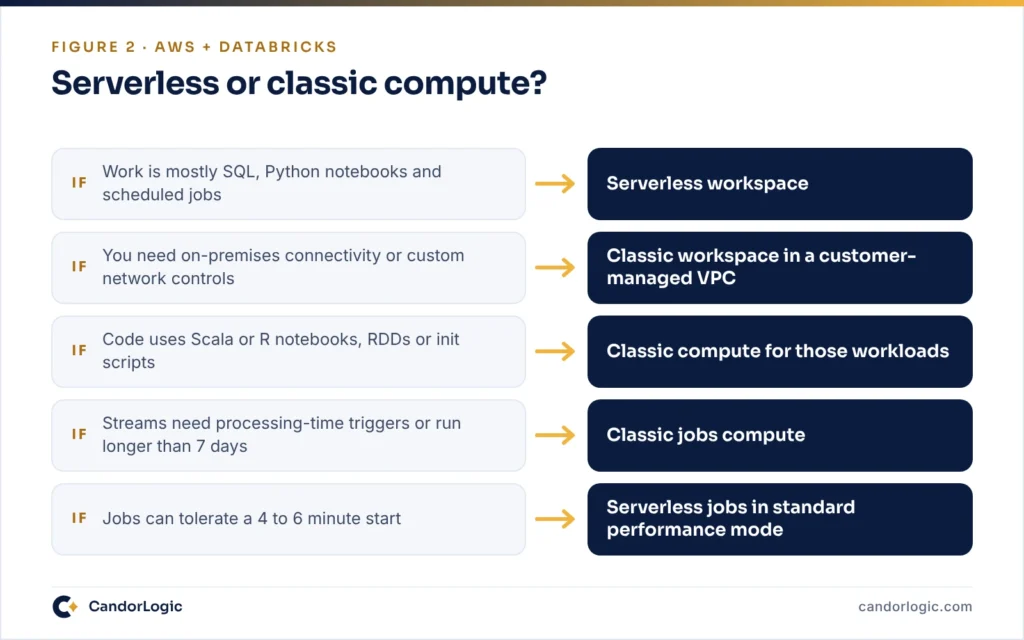
For serverless jobs, the standard performance mode consumes fewer DBUs on the same SKU, in exchange for a startup latency of four to six minutes. Keep performance-optimized mode for time-sensitive jobs. Figure 2 condenses the compute decision.
Step 3: Build the classic network with a customer-managed VPC
For classic compute, deploy into a customer-managed VPC rather than letting Databricks create one. It lets you route traffic through your own firewalls, and it is a prerequisite for private connectivity: a workspace on a Databricks-managed VPC cannot use inbound AWS PrivateLink.
The VPC requirements are specific, and the subnet sizing catches teams out:
- At least two private subnets per workspace, each in a different Availability Zone, with netmasks between /17 and /26.
- Each node uses two IP addresses, so a subnet holds half as many instances as it has free addresses. Size for peak autoscaling, not for today’s clusters.
- Outbound access through a NAT gateway or your own proxy, on the listed ports: 443, 8443 and 8445 to the control plane, and 8444 for Unity Catalog logging and lineage.
- VPC endpoints for S3 (gateway), STS and Kinesis (interface) to keep that traffic off the NAT.
Secure cluster connectivity is the default for new Databricks on AWS workspaces. The VPC has no open inbound ports, cluster nodes have no public IP addresses, and clusters reach the control plane through a relay over HTTPS.
Front-end and back-end AWS PrivateLink
AWS PrivateLink takes the public internet out of the remaining paths:
| Path | What it connects | What you create |
|---|---|---|
| Front-end (inbound) | Browsers, BI tools and API clients to the workspace | An interface endpoint in a transit VPC, registered in the account console |
| Back-end (classic) | Classic clusters to the REST API and the secure cluster connectivity relay | Two interface endpoints in the workspace VPC, with private DNS enabled |
| Serverless private endpoints | Serverless compute to S3, other AWS services or your VPC | Private endpoint rules on a network connectivity configuration |
All three require the Enterprise tier, and back-end PrivateLink also requires secure cluster connectivity. For the front end, attach a private access settings object to every workspace, or all private access is denied. Then test DNS early: the workspace URL must always resolve to the endpoint’s private IP from your corporate network. Context-based ingress policies, generally available since October 2026, add identity and request-type conditions on top.
Step 4: Control serverless compute egress and private access
Classic network controls do nothing for serverless compute on Databricks on AWS, because it does not run in your VPC. Serverless has two account-level controls of its own.
Network policies for egress
Serverless egress control uses network policies. Each account has a default policy that applies to any workspace without an explicit assignment, and each workspace links to exactly one policy. The feature requires the Enterprise tier.
- Full access leaves outbound internet access open.
- Restricted access denies by default. It allows Unity Catalog external locations plus up to 100 domains and 100 S3 storage destinations you list. Workspace storage, system tables and sample datasets stay reachable.
Tip: Enable dry-run mode before you enforce a restricted policy. Violations are logged as DRY_RUN_DENIAL in system.access.outbound_network instead of being blocked, so you can build the allowlist from real traffic. Restart compute after changing the internet access or dry-run setting.
Private endpoints to S3 and AWS services
A network connectivity configuration (NCC) is a regional, account-level object that manages private endpoints, and one NCC can serve up to 50 workspaces in its region. Private connectivity from serverless compute to AWS-managed resources became generally available on October 12, 2026. About 21 services are supported, including S3, STS, KMS, Glue, Secrets Manager, SQS and Amazon Bedrock.
For S3, one rule per NCC per region covers up to 100 bucket names. They carry service API calls only, not JDBC or ODBC connections to RDS or Redshift. Databricks charges per endpoint hour and per GB processed.
Watch out: Update the bucket policy before you enable the endpoint. Databricks recommends an explicit Deny unless aws:SourceVpce matches the serverless endpoint, while still allowing Unity Catalog, which reaches the bucket from the control plane. A blanket Deny on every principal can also lock out your own console and CLI access.
Step 5: Connect S3 to Unity Catalog with IAM roles
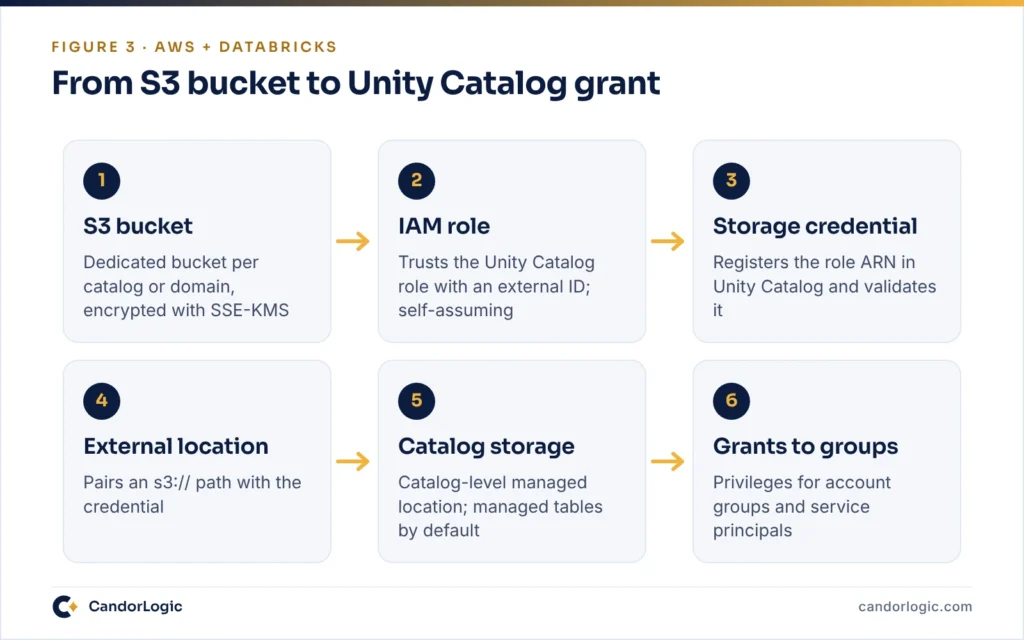
On Databricks on AWS, Unity Catalog reaches S3 through IAM roles, not instance profiles or access keys. An IAM role is registered as a storage credential, and an external location pairs an S3 path with that credential. Grants on the external location decide who can use it. Figure 3 shows the chain from bucket to grant.
The setup sequence has one subtle requirement, the self-assuming role:
- Create the IAM role with a trust policy for the Unity Catalog role
arn:aws:iam::414351767826:role/unity-catalog-prod-UCMasterRole-14S5ZJVKOTYTLand a placeholder external ID. - Attach a policy for the bucket:
s3:GetObject,s3:PutObject,s3:DeleteObject,s3:ListBucket,s3:GetBucketLocationand the multipart actions. Add KMS actions if the bucket uses SSE-KMS. - Create the storage credential, copy its external ID into the trust policy, and add the role’s own ARN as a principal. Databricks blocks credentials whose roles are not self-assuming.
- Create the external location and run Validate Configuration.
- Optionally grant SNS and SQS permissions so Databricks can set up file events.
With the IAM role in place, the Databricks side fits in a few lines of Terraform:
resource "databricks_storage_credential" "sales_prod" {
  name = "sales-prod-s3"
  aws_iam_role {
    role_arn = aws_iam_role.uc_sales_prod.arn
  }
  comment = "Managed by Terraform"
}

resource "databricks_external_location" "sales_prod" {
  name            = "sales-prod"
  url             = "s3://acme-sales-prod/uc"
  credential_name = databricks_storage_credential.sales_prod.id
}

resource "databricks_grants" "sales_prod" {
  external_location = databricks_external_location.sales_prod.id
  grant {
    principal  = "data-platform-engineers"
    privileges = ["CREATE_EXTERNAL_TABLE", "READ_FILES"]
  }
}
Then apply the Unity Catalog best practices that protect the storage layer:
- Prefer catalog-level managed storage as the primary unit of isolation. If you use metastore-level storage, give it a dedicated bucket.
- Make managed tables the default for new tables.
- Limit
CREATE EXTERNAL LOCATIONto administrators, avoid broadREAD FILESorWRITE FILESgrants, and never create tables or volumes at the root of an external location. - For code that calls AWS APIs such as Secrets Manager, use Unity Catalog service credentials (Databricks Runtime 16.2 or above) instead of instance profiles.
Step 6: Encrypt with customer-managed keys in AWS KMS
Customer-managed keys let you hold the AWS KMS key that protects your Databricks on AWS data. They require the Enterprise tier and come in two use cases:
- Managed services: control plane data such as notebook source, secrets, SQL queries, query history and AI/BI dashboards. In a serverless workspace this is the only key you configure.
- Workspace storage: the workspace storage bucket, including the DBFS root, and optionally the EBS volumes of classic compute. It does not apply to default storage.
Two details are easy to miss. With a managed-services key, query history fields such as statement_text stay empty until you also set a key on the system catalog. Also, catalogs backed by default storage can take their own per-catalog key, but only through the account console or REST API. Once enabled, it cannot be disabled, and it does not re-encrypt data written earlier.
Your own S3 buckets are a separate concern. Encrypt them with SSE-KMS, and grant the Unity Catalog role kms:Decrypt, kms:Encrypt and kms:GenerateDataKey* in both the IAM policy and the key policy. Treat key revocation as an emergency control, because revoking a key can disable the workspace.
Step 7: Wire identity: IdP, SCIM and service principals
Identity for Databricks on AWS belongs at the account level, not in each workspace. Databricks’ June 2026 security guidance and its provisioning docs point to the same pattern:
- Configure single sign-on once at the account level and enforce MFA in your identity provider.
- Sync users and groups to the account with automatic identity management (Microsoft Entra ID and Okta) or account-level SCIM. Workspace-level SCIM is a legacy configuration.
- Grant through account groups, avoid direct grants to users, and assign ownership of production catalogs and schemas to groups.
- Run production jobs and pipelines as service principals, and reserve
MODIFYon production tables for them.
For automation, use OAuth rather than personal access tokens. In CI/CD, workload identity federation lets a pipeline exchange its own token for a Databricks token as a service principal, so there is no secret to rotate.
Step 8: Govern compute and cost with policies and system tables
Classic compute gets compute policies. Use them to make the cheap, safe configuration the easy one. This policy definition does all five:
{
  "spark_version": { "type": "fixed", "value": "auto:latest-lts", "hidden": true },
  "autotermination_minutes": { "type": "range", "minValue": 10, "maxValue": 60, "defaultValue": 30 },
  "dbus_per_hour": { "type": "range", "maxValue": 20 },
  "aws_attributes.availability": { "type": "fixed", "value": "SPOT_WITH_FALLBACK" },
  "aws_attributes.first_on_demand": { "type": "fixed", "value": 1 },
  "custom_tags.cost_center": { "type": "allowlist", "values": ["fin-001", "mkt-002"] }
}
Compute policies do not apply to serverless compute. There, use serverless usage policies (in Public Preview), which stamp tags on notebook, job, pipeline and app usage. Those tags land in the custom_tags column of system.billing.usage, next to the tags from classic compute.
System tables are the source of truth for Databricks on AWS cost and audit. system.billing.usage keeps 365 days of usage for the whole account. Join it to system.billing.list_prices to estimate list cost by workspace, product and tag:
SELECT
  u.workspace_id,
  u.billing_origin_product,
  u.custom_tags['cost_center'] AS cost_center,
  ROUND(SUM(u.usage_quantity * p.pricing.default), 2) AS list_cost
FROM system.billing.usage AS u
JOIN system.billing.list_prices AS p
  ON u.cloud = p.cloud
  AND u.sku_name = p.sku_name
  AND u.usage_start_time >= p.price_start_time
  AND (u.usage_end_time <= p.price_end_time OR p.price_end_time IS NULL)
WHERE u.usage_date >= current_date() - INTERVAL 30 DAYS
GROUP BY ALL
ORDER BY list_cost DESC;
This is list price, so it will not match an invoice that includes negotiated discounts. For audit, system.access.audit holds platform events, and verbose audit logging adds notebook commands and queries. Only account and metastore admins can read system tables by default, so grant USE CATALOG, USE SCHEMA and SELECT to your FinOps and security groups.
Step 9: Automate everything and plan disaster recovery
Infrastructure as code
Automate Databricks on AWS with the Terraform provider (databricks/databricks; v1.138.0 shipped on October 19, 2026) alongside the AWS provider. We split state in two. An account-level stack owns workspaces, network configurations, private access settings, NCCs and network policies. Workspace-level stacks own catalogs, external locations, grants and compute policies.
Deploy jobs and pipelines with Declarative Automation Bundles, which the Databricks CLI validates and deploys from a databricks.yml file. Databricks also publishes Security Reference Architecture (SRA) Terraform templates, and the Security Analysis Tool (SAT) checks workspace settings against its best practices.
Disaster recovery
Databricks now recommends managed disaster recovery for cross-region DR of Databricks on AWS. It replicates Unity Catalog metadata, managed Delta table data and workspace assets to a secondary region, and failover completes in minutes.
Note: Managed DR is gated: you apply through your account team. It needs Enterprise workspaces in both regions, the Mission Critical add-on and serverless compute. Materialized views, streaming tables, Lakeflow pipelines, managed volumes and secrets are not replicated, and tables with row filters or column masks fail to replicate.
Without managed DR, run active-passive yourself. Deploy the same Terraform and bundles to both regions with jobs paused in the secondary, copy managed tables with Deep Clone, and replicate external data with S3 Replication. Your RPO for S3 data is yours to define. DR is also not backup: corruption replicates to both regions, so keep Delta time travel and S3 Versioning for recovery from bad writes.
Common Databricks on AWS mistakes and a go-live checklist
Mistakes we see most often
Most problems on Databricks on AWS trace back to a handful of early shortcuts:
- Workspace sprawl. A workspace per team multiplies network, identity and policy work. Use catalogs instead.
- Direct bucket access. Users or service principals with direct S3 access to managed storage bypass Unity Catalog controls and auditing, and can corrupt tables.
- Half-closed egress. Classic egress goes through a firewall while serverless stays on full access.
- People running production. Jobs owned by individuals with personal access tokens break when people leave.
Go-live checklist
- Pricing tier confirmed for the features you need (Enterprise for PrivateLink, CMK and egress control).
- Dev, staging and prod workspaces in separate AWS accounts, with one metastore per region.
- Customer-managed VPC with subnets sized for peak autoscaling and S3, STS and Kinesis endpoints.
- Front-end and back-end PrivateLink in place, with DNS tested from the corporate network.
- Restricted network policy enforced after a dry-run period, plus NCC private endpoints for S3.
- One self-assuming IAM role per storage credential, scoped to its bucket.
- Customer-managed keys for managed services and workspace storage, plus a key on the
systemcatalog. - Account-level SSO and identity sync; groups own production catalogs; service principals run production.
- Compute policies on all classic compute and usage policies for serverless tags.
- Terraform and bundles in CI, and a DR runbook that has actually been tested.
Frequently asked questions
Does Databricks serverless compute run in my AWS account?
No. Serverless compute runs in a serverless compute plane in your Databricks account, in the same AWS region as your workspace. It reads and writes your S3 data through Unity Catalog, and you control its network access with network connectivity configurations and network policies at the account level. In Databricks on AWS, classic compute is the option that runs inside your own VPC.
Do I need a customer-managed VPC for Databricks on AWS?
Not for serverless workspaces, which have no VPC of yours. For classic compute it is strongly recommended, and it is required for AWS PrivateLink: a workspace on a Databricks-managed VPC cannot use inbound PrivateLink. A customer-managed VPC also lets you route egress through your own firewall and size subnets for your autoscaling needs.
Which Databricks pricing tier is required for PrivateLink?
The Enterprise tier of Databricks on AWS. Front-end and back-end PrivateLink, private connectivity from serverless compute, serverless egress control and customer-managed keys all require it. Account-level SCIM provisioning needs Premium or above.
Can Unity Catalog read S3 buckets encrypted with KMS?
Yes. Add kms:Decrypt, kms:Encrypt and kms:GenerateDataKey* to the IAM role behind the storage credential, and update the KMS key policy to grant that role access, as the Databricks setup guide instructs.
How many Databricks workspaces should we create?
As few as your isolation needs allow. Separate SDLC environments (at least dev and prod), then split further only for business units that must not share assets, regulatory boundaries or regions. Use catalogs and schemas for team-level isolation. Databricks advises against deploying more than 50 to 100 workspaces without strong justification and robust automation.
Does Databricks support cross-region disaster recovery on AWS?
Yes, in two ways. Managed disaster recovery, which Databricks recommends, replicates Unity Catalog metadata, managed Delta tables and workspace assets to a secondary region. It is gated and needs the Enterprise tier, the Mission Critical add-on and serverless compute. Otherwise, build active-passive DR yourself with Terraform, bundles, Deep Clone and S3 replication.
Next steps
Treat these nine steps as one Databricks on AWS design, not a menu. The tier decides your network options, the network decides your storage controls, and identity and automation keep the whole thing repeatable. Start with topology and compute, prove the network and storage chain in dev, then promote the same code to prod.
Planning a new workspace or untangling an old one? Our Databricks consulting and AWS data engineering teams do this work daily. More guides live on our insights page, and the full list is under services. When you are ready, get in touch and tell us where your platform stands today.

CandorLogic Engineering Team
Senior data engineers who design, build and hand over governed data platforms on AWS and Databricks. About us
This article is general technical guidance. Cloud services change often: check the linked AWS and Databricks documentation for the current limits and pricing in your region before you build.